How We Built Structured Custom Templates: Letting Users Restyle Without Opening Up Arbitrary CSS
We hear the same request from users all the time: “The GitHub template looks great, but can I change the heading color to our brand color? And bump the line-height a bit?”
It sounds like a small feature, but there’s a tradeoff you can’t avoid: do you open up arbitrary CSS or not?
This post walks through the path we ended up taking — structured overrides on top of existing system templates — and why this fits a “one piece of content, many export formats” tool like md-to.com better than the alternatives.
Two extremes that don’t quite work
Most Markdown tools handle “custom styling” in one of two ways:
Option one: fixed templates only. Simple and stable, but not enough. Users pick the closest-looking template and then immediately wish they could change just one thing — the heading color.
Option two: arbitrary CSS. Maximum freedom, the preview area can be tweaked endlessly. The catch: looking good in the browser doesn’t mean looking good after export.
We build a tool that converts Markdown into PDF / Word / HTML / images, and several of those export paths don’t consume CSS at all:
- Word (
.docx) uses OOXML styles. There’s no concept of “arbitrary CSS” in there. - PDF printing has its own pagination and margin rules. Layouts tuned purely with browser CSS often fall apart at print time.
- Image export goes through canvas screenshotting, and support for some CSS features (parts of
filter,backdrop-filter) is limited.
If we let users write arbitrary CSS, the preview would look fine and exports would silently break. That “what you see is not what you get” gap is a terrible user experience.
So we took a third path.
Our approach: base template + structured overrides
The core idea in one sentence: users pick a system template first, then change a small set of structured fields on top of it.
We don’t store a full template — we store “base template ID + overrides”:
{
  version: 1,
  baseTemplateId: 'classic',
  overrides: {
    colors: {
      heading: '#0F766E'
    },
    fonts: {
      body: 'Noto Sans SC'
    },
    fontSizes: {
      body: 13
    },
    spacing: {
      lineHeight: 1.7
    }
  }
}
Why not store a full template snapshot? Three reasons:
- Users benefit when the base improves. If we later tighten the code-block padding in Classic, custom templates pick up the new value automatically — because the override didn’t touch that field.
- Small payload, easy validation on both ends. The backend only needs to validate a handful of whitelisted fields, not an entire template object.
- The “based on which template” semantic is preserved explicitly. The UI can tell the user “you’ve made 3 changes on top of Classic.”
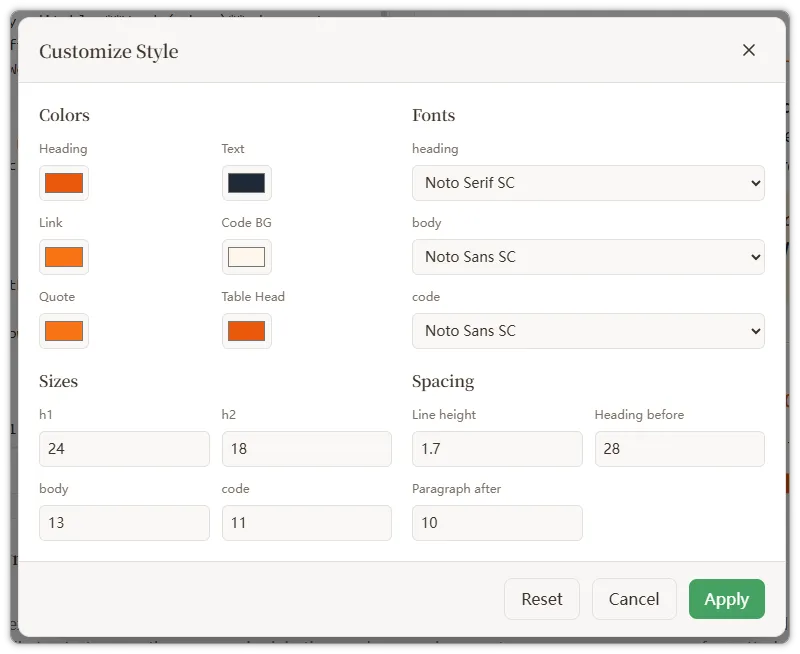
Here’s the current editor UI, covering four high-frequency groups: colors, fonts, font sizes, and spacing:
The runtime: from a single click to a finished export
The whole system has three pipelines.
Pipeline 1: live preview
The user changes a color in the editor and the preview must update immediately:
- The editor writes the new override values into
localStorage.customDocumentTemplate. - The editor dispatches a
template-changeevent. MarkdownPreviewlistens for the event and callsgetActiveTemplate().getActiveTemplate()readsdocumentTemplate(the current base) andcustomDocumentTemplate(the overrides). If they match, it callscreateCustomTemplate(baseTemplate, overrides)to merge them into a complete template.generatePreviewCSS(template)regenerates the preview styles.
The merge logic is straightforward — a shallow merge per field group:
return {
  ...baseTemplate,
  id: `custom:${baseTemplate.id}`,
  colors: {
    ...baseTemplate.colors,
    ...(overrides.colors ?? {}),
  },
  fonts: {
    ...baseTemplate.fonts,
    ...(overrides.fonts ?? {}),
  },
  fontSizes: {
    ...baseTemplate.fontSizes,
    ...(overrides.fontSizes ?? {}),
  },
  spacing: {
    ...baseTemplate.spacing,
    ...(overrides.spacing ?? {}),
  },
};
Pipeline 2: saving as a private template
When the user clicks “Save Template,” the tool adapter packages up the current state:
{
  version: 1,
  toolSlug,
  documentTemplateId,
  customDocumentTemplate
}
This payload goes into saved_templates.settings_json. Note that documentTemplateId and customDocumentTemplate are stored separately — a private template means “Y modifications on top of template X,” not a style snapshot detached from its origin.
Pipeline 3: applying a private template
When the user picks one back from PrivateTemplateSelector, or loads it via the ?tpl=<id> URL parameter:
- The adapter calls
applySettings(settingsJson). - If the payload has a
customDocumentTemplate, it’s written back to localStorage; otherwise it’s cleared. documentTemplateIdis applied.template-changeis dispatched, and the preview / export paths all see the merged complete template.
An easy-to-miss but critical detail: clear overrides when a system template is picked
We added a single line inside setActiveTemplate(templateId):
localStorage.removeItem('customDocumentTemplate');Why? Without this, you get a confusing scenario:
- User customizes Classic with a green heading and that’s stored in localStorage.
- User switches to Dracula.
- User switches back to Classic — and the heading is green again, but they don’t remember changing it.
We define “picking a system template” as an explicit reset: pick a clean template and you get the clean template. To customize again, click “Customize” again. That semantic is much clearer than “preserve the user’s last edits whenever possible.”
TemplatePickerModal runs the same cleanup when “Apply” is clicked.
Backend validation: the whitelist is the safety net
The backend validateTemplateInput() strictly validates settingsJson.customDocumentTemplate:
customDocumentTemplateis optional; if present it must be an object.versionmust be1(room for migration later).baseTemplateIdmust be a non-empty string.overridesmust be an object.- Fields not on the whitelist are rejected.
The whitelist covers everything the UI exposes today, plus a bit more headroom for future fields:
| Group | Allowed fields |
|---|---|
colors | heading, text, link, codeBackground, codeBorder, codeText, quoteText, quoteBorder, quoteBackground, tableHeaderBg, tableHeaderText, tableBorder, tableRowOdd, tableRowEven |
fonts | heading, body, code |
fontSizes | h1, h2, h3, h4, h5, h6, body, code |
spacing | headingBefore, headingAfter, paragraphBefore, paragraphAfter, lineHeight |
The whitelist is the safety net for this whole design: because we don’t accept arbitrary keys, even if we later add rendering logic to a field or rename it, old keys saved by users won’t leak into the runtime template and pollute the output.
The payoff: export paths don’t need to know “custom template” exists
After merging, you have a complete DocumentTemplate, so none of the downstream export functions need to change:
- Preview:
generatePreviewCSS(template) - PDF / print:
generatePdfStyles()/generatePrintStyles() - HTML:
generateExportHTML() - Rich-text copy:
generateRichTextHTML() - Word:
templateToDocxStyles(template)
This is exactly the payoff we got from refusing arbitrary CSS in the first place: as long as every output keeps consuming DocumentTemplate as a unified intermediate representation, cross-format consistency is essentially free. The heading color the user picks shows up identically in browser preview, PDF, Word, and image exports — not “approximately the same,” but literally the same hex value, because everything reads from one merged template.
Current limitations
The first version is intentionally narrow:
- Only high-frequency fields are exposed; not every color, font size, or spacing value is editable.
- There’s no dedicated “name your custom template” entry point — naming still happens through the “Save Template” dialog.
- No JSON import / export for templates.
- No arbitrary CSS.
- The editor UI is a lightweight first pass — grouped panels, color presets, and mobile layout all have room to grow.
Where this is heading
A few clear next steps for this structure:
- More editable fields. Table border color, alternating row backgrounds, quote background, code text color — the whitelist already has slots for these; only the UI is missing.
- A unified field schema. Let the frontend form and backend validation share one definition so they don’t drift apart.
- An “Edit” entry in the workspace template list. Right now you can only save a new copy; you can’t keep editing an existing private template.
- An explicit “duplicate a system template into a private template” flow. Make “I want to base a private one on Classic” a more direct action.
- Custom template JSON import / export. Useful for sharing styles across a team.
In summary
Looking back, the key to this design isn’t what we built — it’s what we didn’t build:
- We didn’t allow arbitrary CSS — which avoided cross-format breakage.
- We didn’t store full template snapshots — which preserved the benefit of base-template upgrades.
- We didn’t silently keep overrides when switching system templates — which avoided the “I didn’t change anything but the style is different” confusion.
- The backend doesn’t accept fields outside the whitelist — which leaves room for the design to evolve.
Constraints actually deliver a more predictable experience. In a tool that spans multiple export formats, that predictability is worth more than freedom.
If you’re also building a “one piece of content, many exports” product, head over to md-to.com and try this custom template system — see whether this is the kind of “just right” amount of freedom you’ve been looking for.
Related Tools
Convert MD to Word (Docx) Online - Free Markdown to Word
Convert Markdown to Word documents instantly. Free online MD to DOCX converter with real-time preview. Keep formatting intact. No signup required - try now!
Free Word to Markdown Converter - Convert DOCX to MD Online
Convert Word documents to Markdown instantly. Free online DOCX to MD converter preserves headings, tables, lists, and formatting. No signup required - try now!
Convert MD to PDF Online - Free Markdown to PDF Converter
Convert Markdown to PDF instantly. Free online MD to PDF converter with 20+ professional templates. Perfect for reports, documentation, and printing. Try now!
Free Markdown to LaTeX Converter - Convert MD to TeX Online
Convert Markdown to LaTeX online for free. Transform your MD documents to TeX format for academic papers and technical documents. No registration required!