Can I Convert Markdown to DOCX? Yes, Here's How (3 Simple Steps)
Yes, you can convert Markdown to .DOCX file. Actually, it’s pretty simple.
If you’re reading this, you probably have a Markdown file and need it in Word format. Maybe your boss wants a DOCX, or you need to share it with someone who doesn’t use Markdown. Either way, you don’t want to spend hours learning complex tools like Pandoc.
Here’s the good news: you can convert Markdown to DOCX in just 3 steps using md-to.com. No installation, no signup, no charge.
Why md-to.com?
Why do I recommend it?
- Simple: 3 steps, done. No learning curve.
- Free: Completely free, no limits, no watermarks.
- Private: 100% local processing in your browser - your files never leave your device.
- Professional: 20+ templates to choose from, with real-time preview.
- Format preservation: Keeps your headings, code blocks, tables, and images intact.
Honestly, the main reason I recommend it is that it just works. You paste your Markdown, preview how it looks, and download the DOCX. That’s it.
How to Convert Markdown to Word(.MD to .DOCX file): 3 Simple Steps
Step 1: Paste or Upload Your Markdown
Visit https://md-to.com/markdown-to-word/
You’ll see an editor on the left. You have three options:
- Paste directly: Copy your Markdown text and paste it into the editor
- Upload a file: Click “Browse File” to upload a .md file
- Load example: Click “Load Example” if you want to test it first
The editor supports all standard Markdown syntax. It handles them all.
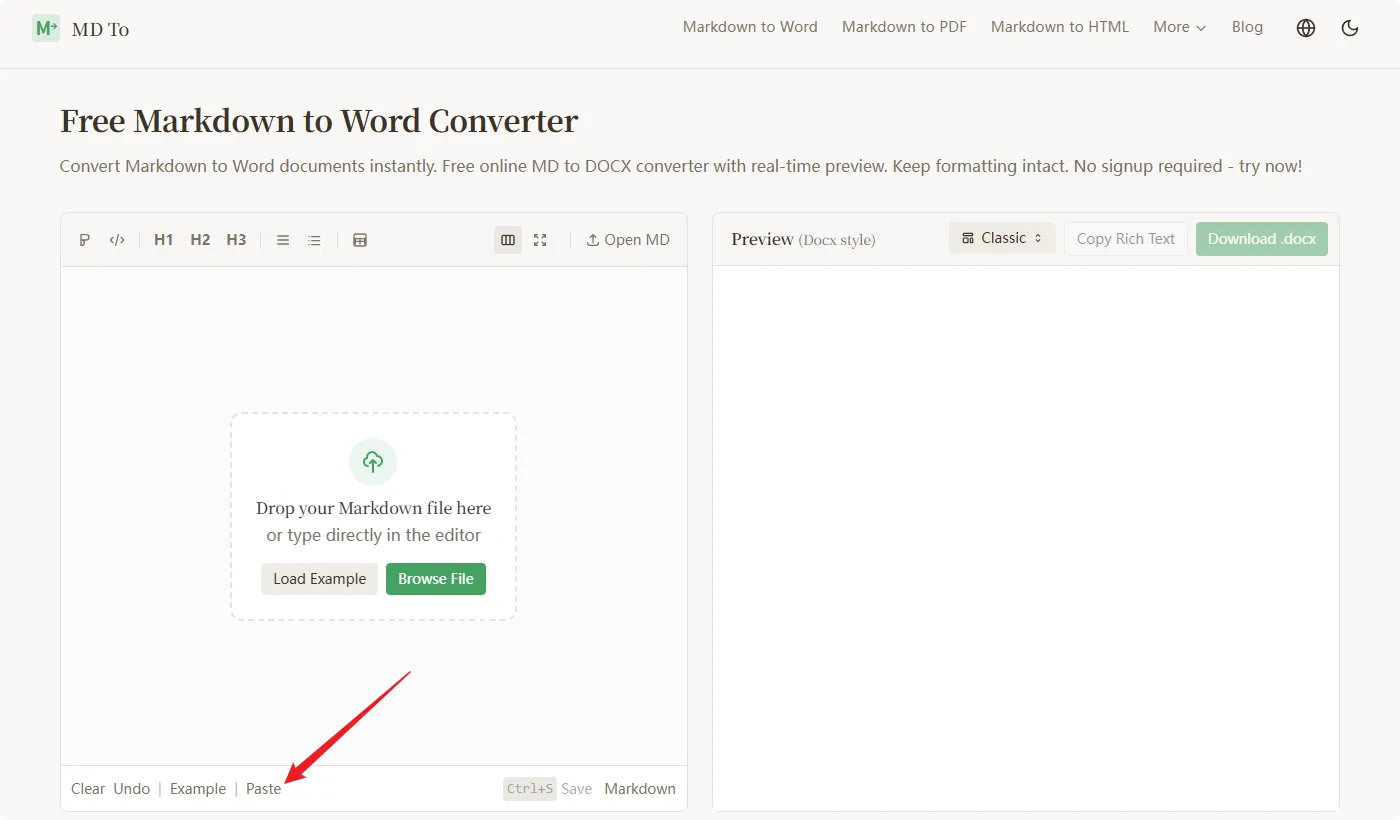
Tip: If you have a large Markdown file, uploading works better than pasting.
Step 2: Preview and Choose a Template
Once your Markdown is loaded, you’ll see the preview on the right side. This is what your Word document will look like.
Now choose a template. There are 20+ options:
- Business: For reports and proposals
- Minimal: Clean and simple
- Academic: For research papers
- Tech: For technical documentation
- Creative: For blogs and articles
Switch between templates to see which one fits your needs. The preview updates in realtime.
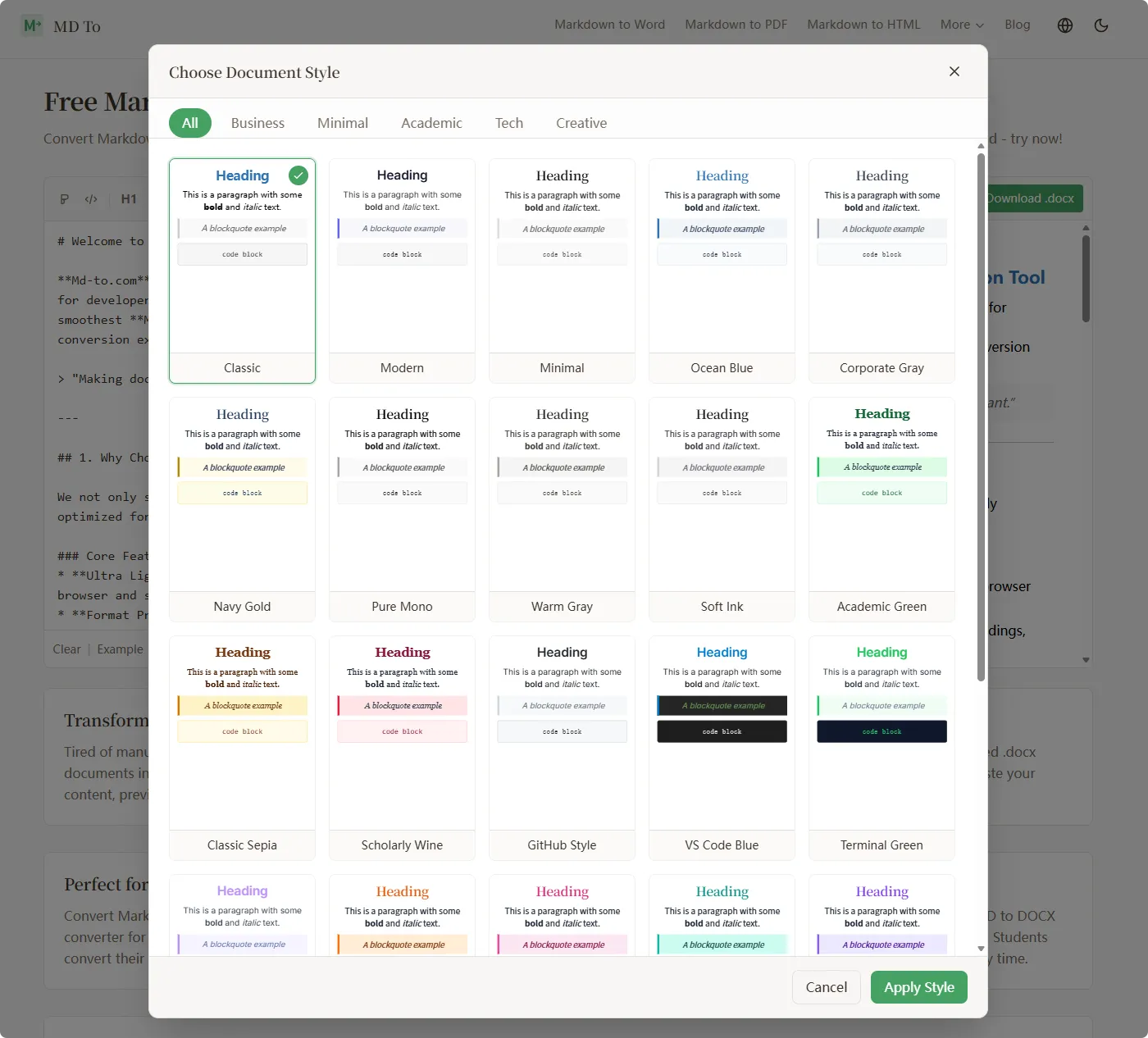
Tip: If you’re converting technical documentation, try the “Tech” or “GitHub Style” templates.
Step 3: Download Your DOCX
Happy with how it looks? Click the “Download .docx” button.
Your Word document will be saved to your computer. You can also:
- Copy rich text to paste into other applications
- Save your Markdown (Ctrl+S) if you want to keep the original
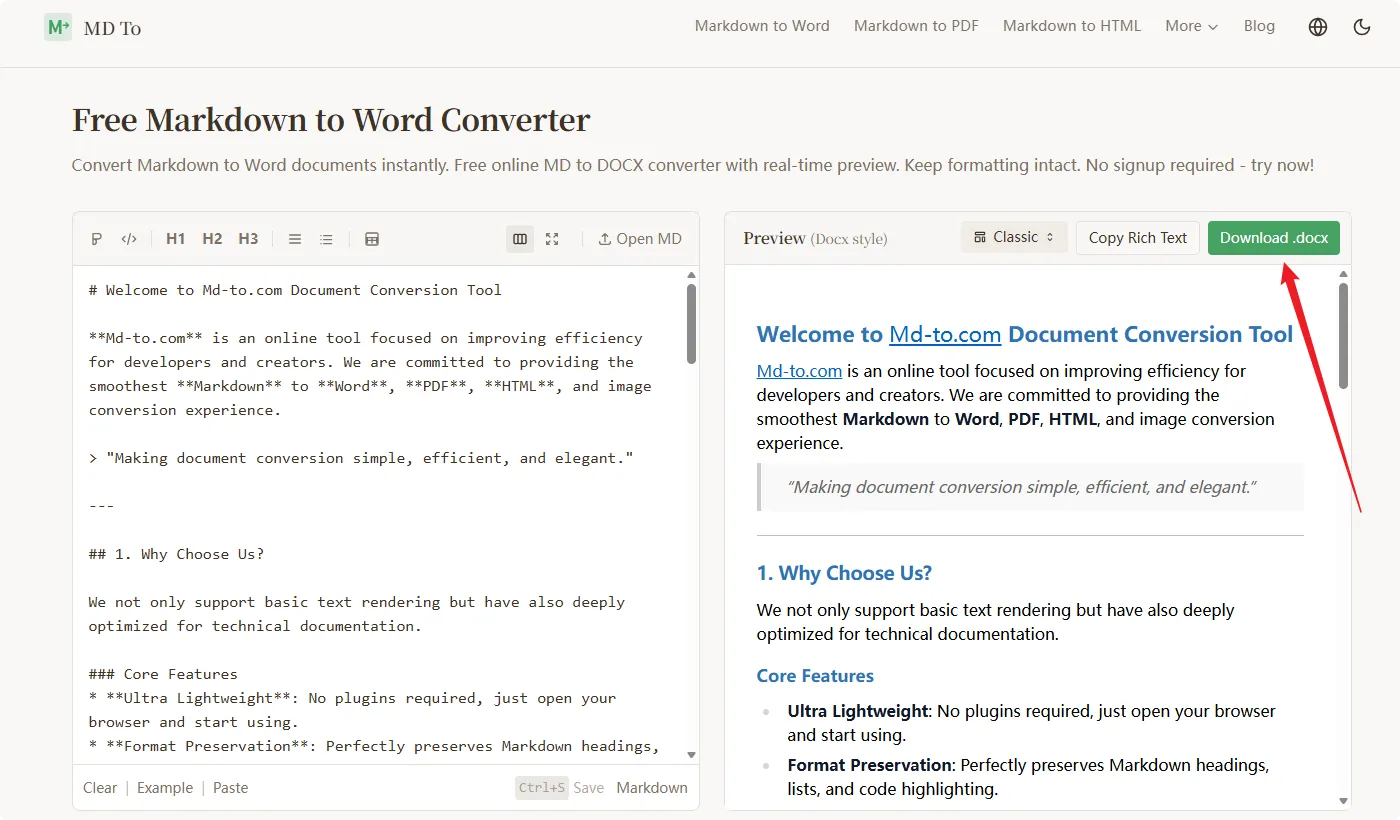
That’s it. Your Markdown is now a properly formatted Word document.
What Gets Preserved?
Worried about formatting? Don’t be. Here’s what md-to.com handles:
Basic formatting:
- Headings (H1-H6)
- Bold, italic, strikethrough
- Ordered and unordered lists
- Blockquotes
- Inline code
- Links and images
Advanced features:
- Code blocks with syntax highlighting (multiple languages supported)
- Complex tables
- Task lists
- Math formulas (LaTeX)
- Nested lists
I tested it - code blocks and tables come out particularly well. The syntax highlighting carries over to Word, which many converters struggle with.
FAQ
Q: Can I edit the generated Word document?
Yes. The .docx file uses native Word styles (Heading 1, Body Text, etc.), so you can keep editing in Word.
Q: How are images handled?
If your Markdown has publicly accessible image links, md-to.com downloads and embeds them automatically.
Q: Is it really free?
Yes. No premium tiers, no usage limits, no watermarks. Convert as many files as you want.
Q: Is my data safe?
All conversion happens in your browser using JavaScript. Your files never leave your device. md-to.com can’t access your content.
Wrapping Up
So there you have it: convert Markdown to DOCX in 3 steps.
- Paste or upload your Markdown
- Preview and choose a template
- Download your Word document
The whole process takes about 30 seconds. No installation, no signup, no charge.
If you need to convert Markdown to Word, visit https://md-to.com/markdown-to-word/ and give it a try.
Resources:
Related Tools
Convert MD to Word (Docx) Online - Free Markdown to Word
Convert Markdown to Word documents instantly. Free online MD to DOCX converter with real-time preview. Keep formatting intact. No signup required - try now!
Free Word to Markdown Converter - Convert DOCX to MD Online
Convert Word documents to Markdown instantly. Free online DOCX to MD converter preserves headings, tables, lists, and formatting. No signup required - try now!
Free Markdown to LaTeX Converter - Convert MD to TeX Online
Convert Markdown to LaTeX online for free. Transform your MD documents to TeX format for academic papers and technical documents. No registration required!